
If you have not completed all the required steps and have not received instructions for scheduling your visa appointment, this article does not apply to you.
If you are clients of our agency, we have paid the SEVIS fee for you, and the confirmation that you must bring to your interview at the Embassy can be downloaded from:
https://www.fmjfee.com/i901fee/index.htm
After accessing the website, select from the main menu: CHECK I-901 STATUS
Then the following screen will open:
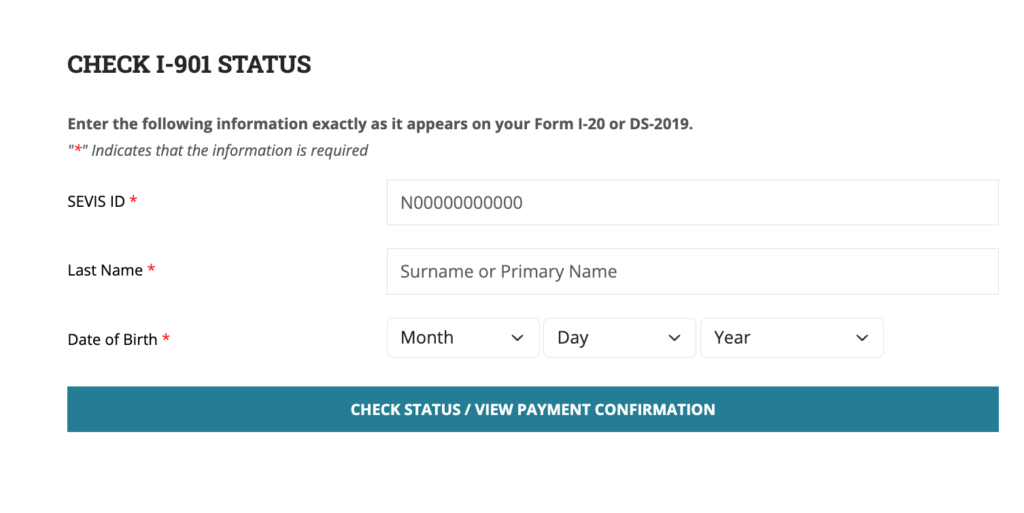
The SEVIS ID number is located in the upper right corner of your DS-2019 document, which you downloaded from your U.S. sponsor profile.
Enter your last name, date of birth, and select CHECK STATUS / VIEW PAYMENT CONFIRMATION
Then select VIEW PAYMENT CONFIRMATION. Once the document opens, click PRINT and choose SAVE AS PDF to your desired location on your computer, or print it immediately, as you will need to bring a printed confirmation to the Embassy.